


Paystub Generator: How to Create Pay Stubs Online
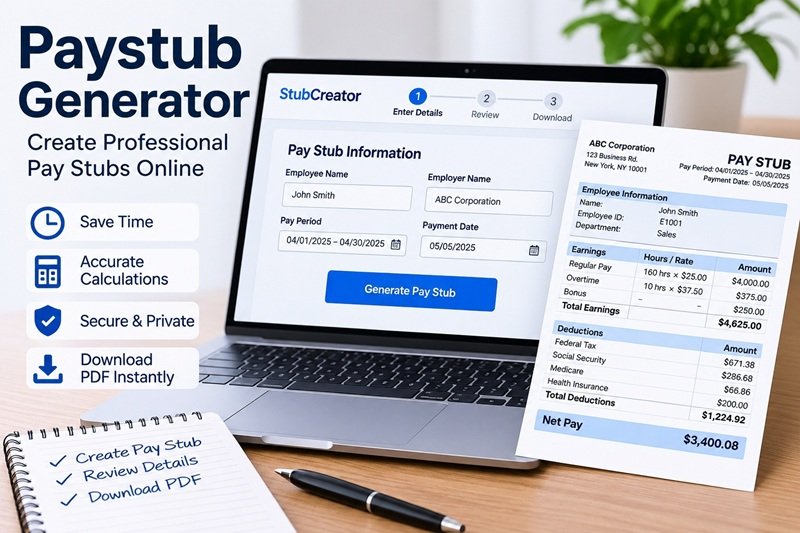
A paystub generator is an online tool that helps employees, employers, freelancers, and independent contractors create pay stubs showing earnings, taxes, deductions, and take-home pay. Instead of preparing every detail manually, users can enter their payroll information into a generator, review the calculations, and create a formatted pay stub for their records.
Whether you manage a small business, work as an independent contractor, or need to organize your income records, a paystub generator can make the process easier. With a tool like Stub Creator, you can enter relevant payroll details, choose a template, review the generated information, and download your pay stub as a PDF.
What Is a Paystub Generator?
A paystub generator is a digital tool designed to create a document that summarizes earnings and deductions for a particular pay period. A pay stub, also called a paycheck stub or pay slip, helps explain how gross earnings are calculated and how much money remains after applicable deductions.
For example, an employee who earns an hourly wage may see regular hours, overtime earnings, taxes, insurance deductions, and net pay listed on the document. A salaried employee may see their salary for the pay period alongside withholding details and year-to-date totals.
A paystub generator organizes this information into a readable format. Depending on the tool, it may calculate payroll amounts automatically, support different templates, and allow users to save or print the finished document.
However, a generator does not independently verify that someone earned the income entered into it. The accuracy of the final pay stub depends on the information supplied and the calculation settings used.
How Does an Online Paystub Generator Work?
Most online paystub generators follow a straightforward process. You provide the necessary information, review the results, and generate the document.
1. Enter Employer and Employee Information
Start by entering the relevant business and employee details. These may include the employer’s name, business address, employee name, and other information required by the selected template.
If you are creating pay stubs for a business, check that the details match your payroll records. Avoid entering sensitive personal information unless the tool genuinely requires it.
2. Add Earnings and Pay Period Details
Next, provide the pay period start date, end date, and payment date. Enter the employee’s salary or hourly rate, hours worked, overtime, commissions, bonuses, or other applicable earnings.
For instance, an hourly employee’s gross pay may be calculated by multiplying the regular hours worked by the hourly rate, then adding any eligible overtime or additional compensation.
3. Review Taxes and Deductions
A paystub generator may calculate applicable federal and state income tax withholding, Social Security, Medicare, insurance deductions, and retirement contributions.
The correct amounts depend on the employee’s circumstances, payroll settings, and applicable tax rules. Review the results instead of assuming every automatically calculated figure is correct.
4. Choose a Pay Stub Template
Select a layout that presents the information clearly. Some generators offer basic templates, modern designs, and options for adding company branding.
StubCreator provides different template styles and optional customization features, depending on the selected product.
5. Check the Details and Download
Before generating the final document, verify the employee information, pay dates, gross earnings, deductions, net pay, and year-to-date totals.
Once everything matches the underlying records, generate the pay stub and save the PDF if that format is available. Keep a copy with the relevant payroll documentation.
What Information Does a Pay Stub Include?
A typical pay stub contains several important sections that explain how an employee’s earnings are calculated.
| Pay stub detail | What it means |
|---|---|
| Employer information | The business name and relevant identifying details |
| Employee information | The employee’s name and applicable identification details |
| Pay period | The dates covered by the payment |
| Gross pay | Total earnings before deductions |
| Taxes withheld | Applicable payroll tax withholdings |
| Other deductions | Benefits, retirement contributions, or other authorized deductions |
| Net pay | The amount remaining after deductions |
| Year-to-date totals | Cumulative earnings and deductions for the year |
Not every pay stub includes exactly the same fields. Requirements and customary formats can vary by state, employer, worker classification, and payroll arrangement.
Who Can Benefit From a Paystub Generator?
A paystub generator can be useful for different types of users, provided the document accurately reflects the underlying financial records.
Small Business Owners
Small businesses often need a consistent way to prepare employee payroll statements. A paystub generator can help organize earnings and deductions without requiring every document to be formatted manually.
However, it should not be treated as a complete replacement for payroll accounting, tax filing, or recordkeeping obligations.
Employees
Employees can use pay stubs to understand their compensation and check whether their wages and deductions match their employer’s payroll records. If an employee needs a copy of an existing pay stub, requesting it from the employer or accessing the company’s payroll portal is generally the best starting point.
Freelancers and Independent Contractors
Freelancers and contractors may need organized records of client payments, business revenue, and expenses. A paystub generator can help create a structured document when the format is appropriate, but self-employment income should not be misrepresented as wages paid by an employer.
Independent contractors may need invoices, payment receipts, bank statements, profit-and-loss statements, or tax documents instead, depending on the purpose.
Self-Employed Professionals
Self-employed professionals can benefit from organized income documentation, especially when preparing financial records or reviewing business earnings. They should use documentation that accurately represents their business structure and actual income rather than creating an employee pay stub that suggests a conventional employer-employee relationship where none exists.
Benefits of Using a Paystub Generator
Saves Time
Preparing a pay stub manually involves formatting information, calculating totals, and checking deductions. An online generator can simplify these steps by organizing the information in a consistent format.
Reduces Calculation Errors
Automated calculations can reduce arithmetic mistakes when the inputs and settings are correct. Users should still verify tax withholding, deductions, and net pay against reliable payroll records.
Provides Consistent Formatting
A standardized template makes it easier to read earnings, deductions, and payment information. This is particularly useful for businesses that prepare multiple payroll statements.
Makes Digital Recordkeeping Easier
A downloadable PDF can be stored alongside other payroll records. Digital copies are easier to organize and retrieve than scattered paper documents, provided they are stored securely.
Offers Convenient Access
An online tool allows users to prepare documents without installing traditional desktop software. Features such as template selection, customization, and PDF delivery depend on the provider.
How to Choose the Right Paystub Generator
Not every paystub generator offers the same features. Before choosing one, consider the following factors.
Calculation accuracy: Look for transparent calculation methods and support for the relevant tax jurisdiction. Always check the output against actual payroll information.
Ease of use: The tool should clearly explain which details are required and how to correct errors before generating the document.
Template options: Choose a format that presents earnings, deductions, and net pay clearly without unnecessary design elements.
Privacy and security: Pay stubs can contain sensitive financial and personal information. Review the provider’s privacy policy, data retention practices, and security information before submitting details.
Pricing transparency: Check the cost per document, optional add-ons, and any recurring charges before proceeding.
Document suitability: Confirm that the generated document is appropriate for your intended use. A professionally formatted pay stub is not automatically verified payroll evidence or proof of employment.
Why Consider StubCreator for Creating Pay Stubs?
StubCreator offers an online paystub generator for people who need to create formatted pay stubs without preparing the layout from scratch. Its platform includes payroll information fields, automated calculation features, template choices, and PDF access.
The website advertises one free pay stub per year, with additional pay stubs starting at $4.99. Prices can vary by template and optional features, so check the current pricing before placing an order.
For users who want a straightforward workflow, the main advantage is convenience: enter the necessary details, review the calculations, select a suitable template, and generate the document.
To get a useful result, make sure the information matches your real payroll or income records. If you need documentation for a bank, landlord, government agency, or another organization, ask that organization which forms of evidence it accepts before relying on a generated pay stub.
Frequently Asked Questions About Paystub Generators
What is the best paystub generator?
The best paystub generator depends on your needs. Look for accurate calculations, suitable templates, clear pricing, privacy safeguards, and support for the relevant tax jurisdiction. StubCreator is one option for creating formatted pay stubs online.
Can I create a pay stub online for free?
Some tools offer free pay stub creation or limited free use. StubCreator advertises one free pay stub per year, with additional pay stubs starting at $4.99. Check the current pricing and template details before generating a document.
How long does it take to generate a pay stub?
The process can take only a few minutes when you already have the necessary payroll information. The time required depends on the complexity of the earnings, deductions, and tax details that need to be entered and checked.
Can a paystub generator calculate taxes automatically?
Many generators offer automated tax and deduction calculations. However, results depend on accurate inputs, appropriate settings, and current applicable tax rules. Review the figures carefully before using the document.
Can self-employed people use a paystub generator?
Self-employed people can use suitable tools to organize financial information, but their documents must reflect their actual business and income arrangements. Depending on the situation, invoices, bank statements, tax returns, or profit-and-loss statements may be more appropriate than an employee pay stub.
Can I use a generated pay stub as proof of income?
Acceptance depends on the organization requesting the documentation and the evidence it requires. A generated pay stub is not automatically verified proof of income. Use truthful information and provide supporting payroll, banking, or tax records when requested.
Is an online paystub generator safe?
Safety depends on the provider’s security practices, privacy policy, and handling of personal information. Choose a service that explains how data is protected and retained, and avoid sharing unnecessary sensitive information.
Final Thoughts
A paystub generator can simplify the process of creating organized pay stubs by bringing earnings, deductions, taxes, and net pay together in one document. It can save time, improve consistency, and make digital recordkeeping easier for businesses and individuals.
The important part is accuracy. Use real payroll or income information, review every calculation, and select documentation that matches your employment or business situation. If you need an online tool to prepare a formatted pay stub, StubCreator provides templates and automated calculation features that can help streamline the process.