

What is Managed Workspace? The Complete Guide to Flexible Office Solutions
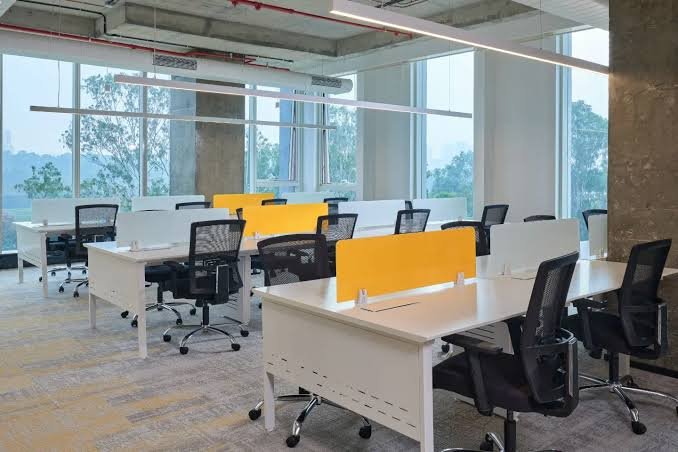
The way businesses work has fundamentally changed. The traditional 9-to-5 office setup is no longer the only option, and many companies are discovering the power of managed workspace solutions. If you’re considering a managed workspace for your team or curious about what modern flexible offices offer, this guide will walk you through everything you need to know.
A managed workspace isn’t just a desk in a building. It’s a complete ecosystem designed to help your business operate efficiently, scale quickly, and maintain professionalism without the overhead of traditional office management.
Quick Answer
A managed workspace is a fully-serviced office solution that provides furnished desks, high-speed internet, meeting rooms, and administrative support—all without the burden of managing infrastructure. Companies like Table Space offer managed workspace solutions that allow businesses to focus on growth while the facility handles everything else. It’s ideal for startups, remote teams, and established companies looking for flexibility and cost savings.
What is Managed Workspace?
A managed workspace is a fully-serviced office environment where companies rent dedicated or flexible desk space along with professional amenities and support services. Unlike traditional offices where you own or lease raw space and manage everything yourself, a managed workspace provider handles all the operational complexity.
Think of it as moving from owning a car to using a ride-sharing service. You get the benefit without the maintenance burden.
Core Components
A typical managed workspace includes:
- Furnished office space – Ready-to-use desks and workstations
- High-speed internet – Reliable connectivity guaranteed
- Meeting rooms – Bookable conference spaces for client meetings
- Administrative support – Reception, mail handling, and basic services
- Utilities and maintenance – Electricity, water, air conditioning, cleaning included
- Professional address – Business address for credibility
- Security and access control – 24/7 access with key cards or biometric entry
The managed workspace provider essentially acts as your office landlord, facilities manager, and administrative support—all rolled into one.
How Managed Workspace Works
Understanding how a managed workspace operates helps you evaluate if it’s right for your business.
The Setup Process
Step 1: Assessment
You meet with the managed workspace provider to discuss your needs—team size, meeting room requirements, and growth projections. This is where providers like Table Space help you find the right configuration.
Step 2: Space Selection
You choose between dedicated desks (fixed workspace for your team), hot desking (flexible seating), or private cabins depending on your business model and budget.
Step 3: Onboarding
Once terms are agreed, the provider sets up your workspace, provides access credentials, and trains your team on facilities usage and support processes.
Step 4: Ongoing Operations
Your team works in the managed workspace while the provider handles everything—maintenance, utilities, cleaning, security, and customer support.
Step 5: Scaling
As your team grows, you can easily expand within the managed workspace or adjust your agreement. This flexibility is a major advantage.
Types of Managed Workspace Solutions
Different managed workspace options cater to different business needs.
Dedicated Desks
Your team has assigned, permanent seats in the shared facility. You maintain consistent workspace while benefiting from professional infrastructure and community.
Best for:
- Small teams wanting stability
- Companies that need consistent client meetings
- Startups growing into their brand identity
Hot Desking
Flexible seating where team members use available desks daily. No assigned seats means maximum flexibility but less personalization.
Best for:
- Remote-first companies
- Teams with flexible schedules
- Businesses scaling rapidly with uncertain team size
Private Cabins
Fully enclosed offices within the managed workspace facility. You get privacy while maintaining access to shared amenities.
Best for:
- Client-facing businesses
- Teams needing confidential work areas
- Companies wanting a mix of privacy and flexibility
Hybrid Solutions
Combination of dedicated and flexible spaces. Some team members have permanent desks while others hot desk as needed.
Best for:
- Distributed teams
- Companies with unpredictable attendance
- Organizations balancing flexibility with stability
Key Features of Modern Managed Workspace
Today’s managed workspace solutions offer far more than just desks. Here’s what sets quality providers apart.
Technology Infrastructure
- Gigabit internet – Minimum 100 Mbps speeds (often much faster)
- WiFi coverage – Multiple access points for reliability
- Video conferencing – Dedicated meeting rooms with professional equipment
- Cloud connectivity – Seamless integration with your tools and systems
Professional Amenities
- Reception services – Someone greets your clients professionally
- Meeting rooms – From small huddle spaces to large conference areas
- Printing and copying – Professional-grade equipment available
- Pantry facilities – Coffee, tea, and sometimes snacks included
Administrative Support
- Mail handling – Professional mail collection and distribution
- Package management – Secure handling of deliveries
- Visitor management – Professional check-in process for clients
- Business services – Help with basic administrative tasks
Community and Networking
- Community events – Networking sessions and workshops
- Collaboration spaces – Areas designed for informal meetings
- Member directory – Connect with other entrepreneurs and professionals
- Industry connections – Access to business networks within the facility
Benefits of Managed Workspace
Understanding the real advantages helps you make an informed decision about whether managed workspace suits your business.
Cost Efficiency
Eliminated hidden costs – You know exactly what you’re paying. No surprise facility management bills, no unexpected repairs.
Lower initial investment – No need to buy furniture, set up IT infrastructure, or sign expensive utility contracts.
Predictable expenses – Budget forecasting becomes easier with fixed monthly costs.
No long-term commitments – Most managed workspace providers offer flexible terms, unlike traditional office leases which lock you in for 3-5 years.
Flexibility and Scalability
Grow without hassle – Need more space? Request additional desks. Downsizing? Reduce your footprint easily.
Trial periods – Many managed workspace providers let you start small and expand as your business grows.
Location flexibility – Change locations if your business needs shift without starting from scratch.
Exit flexibility – Leave on 30-60 days notice instead of breaking a multi-year lease.
Professional Image
Business address – A prestigious office address enhances credibility with clients and investors.
Professional meeting spaces – Impress clients with well-equipped conference rooms instead of meeting at coffee shops.
Professional reception – Clients experience a polished, professional environment when they visit.
Brand confidence – Your team feels proud working in a professional setting.
Productivity and Support
Ready-to-work environment – No setup time. Start working immediately.
Dedicated support – A team handles operations so you focus on business growth.
Reliable infrastructure – Backup power, security, and maintenance mean fewer disruptions.
Community support – Being around other professionals creates accountability and motivation.
Time Savings
No facilities management – Stop worrying about maintenance, cleaning, and repairs.
No IT infrastructure setup – High-speed internet and tech support are included.
No administrative overhead – Reception and basic services are handled for you.
Focus on business – Spend time on what matters: growing your business, not managing your office.
Managed Workspace vs. Traditional Office: Comparison Table
| Factor | Managed Workspace | Traditional Office |
|---|---|---|
| Setup time | 7-14 days | 2-3 months |
| Initial investment | Low (minimal furniture needed) | High (furniture, IT, utilities) |
| Monthly cost | Fixed, all-inclusive | Variable (rent, utilities, maintenance) |
| Flexibility | Easy to scale up or down | Locked into long-term lease |
| Infrastructure | Included and maintained | Your responsibility |
| Support services | Included (reception, cleaning) | Hire separately or manage yourself |
| Professional image | Immediate | Takes time to establish |
| Community | Built-in networking | None unless you create it |
| Exit option | 30-60 days notice | Break lease penalties |
| Customization | Limited | Full control |
Who Should Choose Managed Workspace?
Managed workspace works best for specific business types and situations.
Startups and Early-Stage Companies
Why it fits: Conserve cash, start lean, access professional infrastructure without capital expenditure.
Example: A fintech startup can impress investors with a professional address and meeting spaces while keeping overhead low.
Remote-First Companies
Why it fits: Your distributed team needs occasional meeting spaces and a business address without a permanent office.
Example: A software development agency can book meeting rooms when clients visit while maintaining flexibility for distributed work.
Growing Teams
Why it fits: Scale office space as your team grows without renegotiating leases or moving offices.
Example: A marketing agency can add desks monthly as they hire new team members.
Client-Facing Businesses
Why it fits: Professional meeting rooms and addresses are critical for credibility.
Example: Consulting firms, agencies, and professional services benefit from impressive client meeting environments.
Companies Testing New Markets
Why it fits: Enter new cities or regions without long-term office commitments.
Example: An e-commerce company expanding into new states can test local markets with minimal risk.
Freelancers and Solo Entrepreneurs
Why it fits: Professional workspace and networking without the cost and commitment of dedicated offices.
Example: Consultants can work from professional spaces, meet clients, and access community support.
Common Mistakes When Selecting Managed Workspace
Avoid these pitfalls when choosing a managed workspace provider.
Choosing Based on Price Alone
The mistake: Selecting the cheapest option without evaluating quality, location, or amenities.
The impact: You end up in a facility with poor internet, unprofessional surroundings, or terrible location—costing you more in productivity losses.
The fix: Compare total value, not just monthly rent. A slightly pricier option with better infrastructure pays for itself.
Ignoring Location
The mistake: Picking a cheaper space far from your clients or team’s homes.
The impact: Client acquisition suffers, team morale decreases, and you waste time commuting.
The fix: Prioritize location that serves your clients and team, even if it costs more.
Not Testing Infrastructure
The mistake: Taking the provider’s word that internet is “fast” or backup power is “reliable.”
The impact: You discover issues after committing—slow internet kills productivity, power cuts disrupt operations.
The fix: Test internet speeds yourself, ask current users about power reliability, and verify during different times of day.
Overlooking Community Value
The mistake: Treating managed workspace as just desks and ignoring networking opportunities.
The impact: You miss potential partnerships, clients, and collaborators within the facility.
The fix: Ask about community events and spend time understanding the business ecosystem within the managed workspace.
Signing Long-Term Without Flexibility
The mistake: Committing to 2-year terms because of a small discount.
The impact: Your business needs change, but you’re locked into an expensive commitment.
The fix: Prioritize flexibility even if the monthly rate is slightly higher. The option to exit is worth the extra cost.
Ignoring Hidden Costs
The mistake: Only looking at monthly desk fees without asking about meeting room rates, parking, or additional services.
The impact: Your actual costs are 30-50% higher than you budgeted.
The fix: Get a detailed breakdown of all costs including hourly meeting room rates, parking, and any premium services.
Expert Tips for Maximizing Managed Workspace
Get the most out of your managed workspace investment with these strategies.
Tip 1: Use the Community Intentionally
Don’t just work at your desk. Attend community events, introduce yourself to other members, and look for collaboration opportunities. Some of the best business deals happen in managed workspaces through informal networking.
Tip 2: Optimize Your Desk Setup
Even though it’s managed workspace, personalize your area slightly—add a plant, organize your desk thoughtfully, and make it feel professional. A well-organized desk improves focus and impresses clients.
Tip 3: Leverage Support Services
Use the reception team strategically. They can screen calls, handle mail professionally, and manage logistics so you focus on core business activities.
Tip 4: Book Meeting Rooms in Advance
Popular meeting rooms fill up quickly. Book them early, especially if you have client meetings or important calls scheduled.
Tip 5: Understand Your Package
Know exactly what’s included in your plan—how many meeting room hours, parking spaces, and support services are part of your fee. Don’t pay extra for things you thought were included.
Tip 6: Build Accountability
Use the professional environment to stay accountable. Working around other professionals creates motivation and discipline that’s harder to maintain working from home.
Tip 7: Scale Strategically
Plan your growth trajectory. If you’re expanding quickly, discuss expansion options with your managed workspace provider upfront so you can secure additional space when needed.
Frequently Asked Questions
What is the typical cost of managed workspace?
Managed workspace costs range from ₹8,000 to ₹40,000+ per seat monthly depending on location, amenities, and facilities. Premium locations like business districts cost more, while emerging areas offer better value. Table Space, for example, provides competitive pricing with flexible plans suited to different business sizes.
Can I try managed workspace before committing?
Yes. Most managed workspace providers offer trial periods or month-to-month options at a slightly higher rate. This lets you test if the space suits your workflow and team before long-term commitment.
What happens if my team grows and I need more space?
Most managed workspace providers prioritize existing members for expansion. Talk to your provider about growth plans upfront so they can reserve additional space. Table Space, for instance, facilitates seamless scaling as your team grows.
Is high-speed internet really included in managed workspace?
Quality managed workspace providers include high-speed internet (typically 100+ Mbps). However, verify actual speeds during your tour. Some facilities prioritize community areas over workspace speeds—ask about dedicated bandwidth for your desks.
Can I book meeting rooms as needed, or do I need a package?
Most providers include a set number of meeting room hours in your plan. Additional bookings are usually available at hourly rates (₹1,000-3,000 depending on room size). Understand your included hours before choosing a plan.
Do managed workspaces require long-term contracts?
It depends on the provider. Premium managed workspace solutions offer flexibility—monthly, quarterly, or annual plans. Table Space typically offers flexible terms, but always confirm notice periods and exit clauses before signing.
Is parking included in managed workspace fees?
Parking is often charged separately (₹1,000-5,000 monthly). Some facilities offer limited free parking while others charge hourly rates. Always ask about parking specifics when evaluating managed workspace options.
What if I need to leave early?
Most managed workspace providers require 30-60 days written notice for exit. Some charge early termination fees if you’re locked into a contract. Always clarify exit terms before committing—this flexibility is a key advantage of managed workspace.
Can I hold confidential client meetings in managed workspace?
Yes. Private cabins and dedicated meeting rooms provide confidentiality. However, open hot-desking areas aren’t suitable for sensitive discussions. Choose managed workspace with private meeting rooms if client confidentiality is critical.
How is managed workspace different from co-working?
Co-working prioritizes community and flexibility with shared everything. Managed workspace offers more stability, professional image, and dedicated space options. Choose based on whether you prioritize community vibes (co-working) or professional stability (managed workspace).
Conclusion
Managed workspace has revolutionized how businesses approach office needs. It eliminates the complexity of facilities management while providing professional infrastructure, cost predictability, and flexibility that traditional offices can’t match.
Whether you’re a startup conserving cash, a growing team scaling quickly, or a client-facing business needing impressive meeting spaces, managed workspace solutions offer tangible benefits. The key is choosing a provider aligned with your needs—one that offers reliable infrastructure, professional support, and genuine community value.
Solutions like Table Space demonstrate how modern managed workspace providers go beyond just offering desks. They create complete business ecosystems designed to help companies focus on growth while the facility handles operations.
The future of work isn’t about owning massive office buildings. It’s about flexible, professional, community-driven workspaces where businesses can scale efficiently. If you haven’t explored managed workspace yet, now’s the time to discover how it can transform your operations and reduce overhead while maintaining professionalism and credibility.
Key Takeaways
- Managed workspace is a fully-serviced office solution combining furnished desks, high-speed internet, meeting rooms, and administrative support
- Unlike traditional offices, managed workspace requires no infrastructure management—the provider handles everything
- Cost efficiency is a major advantage—fixed monthly fees with no surprise maintenance costs or long-term lease commitments
- Flexibility and scalability make managed workspace ideal for startups, growing teams, and companies testing new markets
- Professional image, community networking, and reliable support services add value beyond just physical space
- Quality managed workspace offers dedicated desks, hot desking, private cabins, or hybrid configurations based on business needs
- Avoid common mistakes like choosing based on price alone, ignoring location, or not testing infrastructure
- Managed workspace typically costs ₹8,000-40,000+ monthly depending on location and amenities
- Providers like Table Space offer flexible terms, quality infrastructure, and professional support to simplify workspace decisions
- The best managed workspace solution aligns with your growth trajectory, team size, and professional requirements